

3 Photoshop rules for the perfect composite
Improve your speed and flexibility with these three Photoshop rules for composites.
Daily design news, reviews, how-tos and more, as picked by the editors.
You are now subscribed
Your newsletter sign-up was successful
Want to add more newsletters?
Five times a week
CreativeBloq
Your daily dose of creative inspiration: unmissable art, design and tech news, reviews, expert commentary and buying advice.
Once a week
By Design
The design newsletter from Creative Bloq, bringing you the latest news and inspiration from the worlds of graphic design, branding, typography and more.
Once a week
State of the Art
Our digital art newsletter is your go-to source for the latest news, trends, and inspiration from the worlds of art, illustration, 3D modelling, game design, animation, and beyond.
Seasonal (around events)
Brand Impact Awards
Make an impression. Sign up to learn more about this prestigious award scheme, which celebrates the best of branding.
As the senior environment artist at Infinity Ward, Devon Fay has a wealth of experience and insider tips when it comes to the perfect composite. Here, he talks through some important tips to help add speed and flexibility to your lighting and finishing workflow with a look at some Photoshop basics.
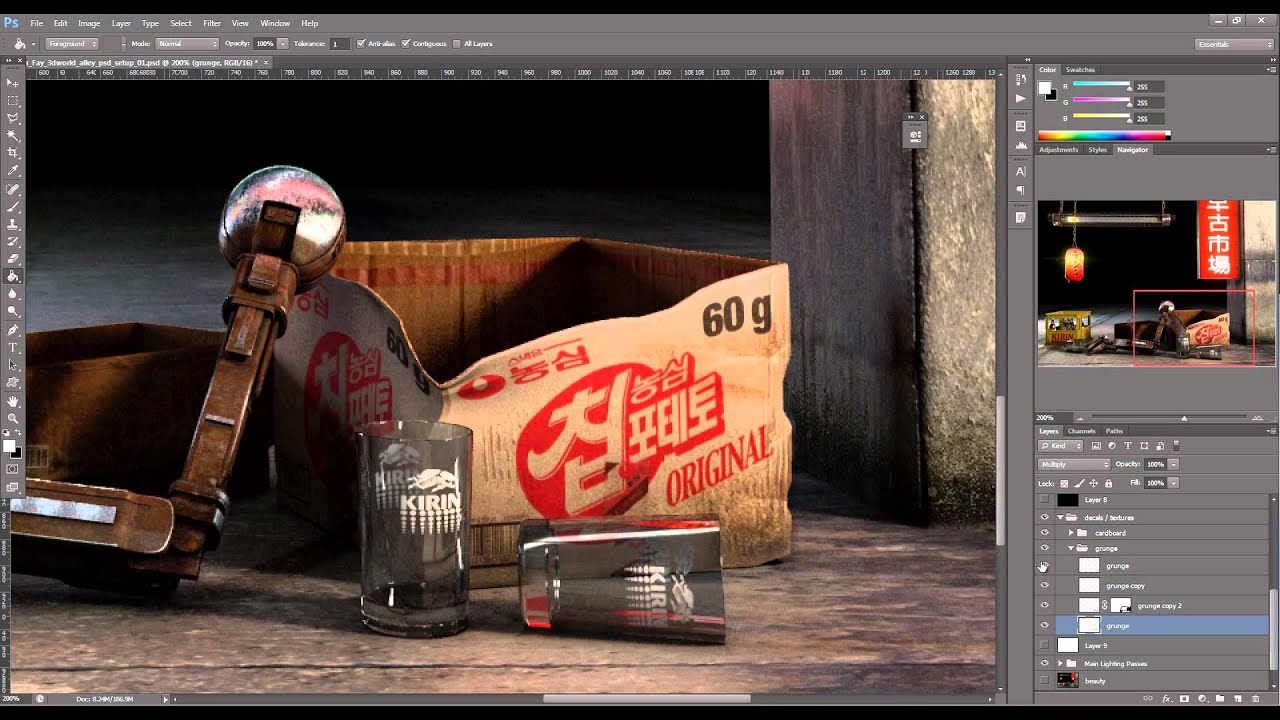
01. It's all just maths
By simply adding and multiplying the proper layers, in the proper place, you can set yourself up for a perfect composite. Download my image guide from 3D World issue 202 Vault for a basic overview of how to add and multiply layers to affect your image.
02. Remember perspective
Make sure to warp your textures into the proper perspective
while placing them. Your whole image will seem off if you skip this step. I imported a texture from CG Textures, used Warp to place it and Multiply to fix.
03. Use multiple Blur values and hues
By using more than one blur value, and more than one hue, you can vastly improve the overall appeal of your glows. Here, I've multiplied my Gaussian Blur again and again before colour correcting for the final result.
Words: Devon Fay
Devon is a senior environment artist at Infinity Ward as well as an instructor at the Gnomon School of VFX. He has five years' experience in the video game industry, with studios such as Blizzard and Neversoft. These tips originally appeared in 3D World issue 202. Head here to purchase the magazine for his full tutorial.
Like this? Read these!
Daily design news, reviews, how-tos and more, as picked by the editors.

The Creative Bloq team is made up of a group of art and design enthusiasts, and has changed and evolved since Creative Bloq began back in 2012. The current website team consists of eight full-time members of staff: Editor Georgia Coggan, Deputy Editor Rosie Hilder, Ecommerce Editor Beren Neale, Senior News Editor Daniel Piper, Editor, Digital Art and 3D Ian Dean, Tech Reviews Editor Erlingur Einarsson, Ecommerce Writer Beth Nicholls and Staff Writer Natalie Fear, as well as a roster of freelancers from around the world. The ImagineFX magazine team also pitch in, ensuring that content from leading digital art publication ImagineFX is represented on Creative Bloq.
