Oooh, that unmatched satisfaction of peeling a perfectly printed label or sticker and slapping it on your water bottle, food container or whatever else is close by! If anyone knows what I'm talking about, this one's for you – the crafting giant Cricut is taking the joy of label and high-end sticker making to the next level with two new machines: the Cricut StickerPix Print and the Cricut StickerPix Print + Cut.
Available now, both models could easily hit our lists of the best label makers, or the best laminators. But they're so much more than that. They serve as compact mini-print shops that print and laminate pro-quality, water- and scratch-resistant stickers and photos using ultra-vivid 300 DPI dye-sublimation technology.
That may be a mouthful, but it basically means these are very capable little things. The standard Cricut StickerPix Print (£159.99 for the Essential Bundle) works seamlessly with pre-cut sticker sheets—perfect for quick, uniform labels. Meanwhile, the advanced Cricut StickerPix Print + Cut (£249.99 for the Essential Bundle) adds a built-in cutter, automatically kiss-cutting custom shapes directly around your unique designs. Both connect effortlessly to the free Cricut Design Space app, meaning you can transform your smartphone photos and designs into tactile stickers in minutes.
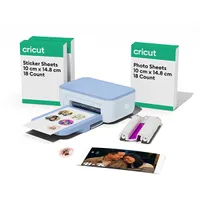
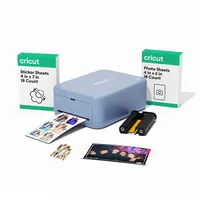


So, who's this for? Well, everyone from label/sticker homebody maniacs to digital artists and small business owners.
If you run a market stall or Etsy shop, the StickerPix Print could be a really nice addition to your business. It’s efficient for batch-printing logos, price tags, QR codes, or packaging seals using the pre-cut circular and rectangular sheets. And, because the dye-sublimation prints come out completely dry and laminated, you won't have to worry about smudging labels. It's also ideal for anyone who wants to label their spice jars or craft room storage without fussing over intricate cuts.
I think there's also scope for illustrators to use these things, especially those who want to share their art at conventions – after all, everyone loves stickers! You can upload a hand-drawn illustration or a photo from your phone, and the machine will print, laminate, and precisely kiss-cut a custom border around the image so the backing stays intact for easy peeling.
For me, I'm excited to use them to create unique water bottle sticks and fun gifts for my son's birthday party bags.
Looking around at the other sticker makers in this price range, I think Cricut has successfully bridged the gap between a pro print shop and an everyday crafting tool. I can't wait to get my hands on them to fully try them out.