I've been using different computer mice for donkeys' years, and there's been a clear evolution in the models I've had under my hand. First, there was whatever wired option came with the office space; then I graduated to an ergonomic, grown up option; then finally an ultra-responsive, ultra-light gaming mouse.
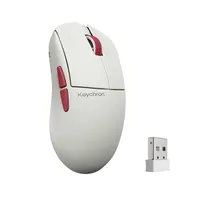
And though there are merits to all the above, I've finally found the perfect mouse for me – the Keychron G4. And though it only got released in April this year, I can confidently say that it's the best PC mouse that I've ever used.
Excellent competition


A great PC mouse needs to be reliable, ergonomic, have excellent user experience, useful features, and look good.
For years the Logitech MX Master series nailed the ergonomic side of things for me, though it was never the prettiest thing on my desk. The strongest of Logitech's mice, it's built well and has great shortcut buttons, but once you discover the speed of gaming mice, it can seem a little sluggish (I highly advise going for the 3s over the newer 4, for reasons I go into in this article).
The Sony Inzone Mouse-A opened my eyes. As my first gaming mouse (for office work, not gaming), this thing was so fast, it kind of spoiled the MX Master series for me. And even with some persistent pairing issues, I stuck with it as I love how responsive it is.
But the G4 is that and more – it blows both of these out of the water.
End-game mouse boss


The Keychron G4 is first and foremost an incredibly reliable mouse. I've had no issues with pairing, as I have with the Mouse-A. It's also the prettiest mouse I've owned. I love me a mechanical keyboard, and though previous mice blended into the background on my desktop, the G4 visually holds its own. It looks like a conscious design choice, not an "oh, and I'd better buy a mouse too" add-on.
Its ergonomics are not as strong as the Logitech MX Master 3s, but the G4's 55-gram weight makes it effortless to move, and its shape is plenty comfortable to use for hours at a time.
Perhaps its most important attribute for me is that I can switch between my MacBook Air and my gaming PC with zero fuss, and I also have instant control over its DPI and report rate. This may seem a small thing, but I was previously using the 3S for Mac work, and the Mouse-A for gaming PC. Now the G4 does it all, and looks so much better in the process.
Obviously my two-PC use case is fairly unique. But even if you're looking for a new productivity mouse, I still highly recommend the G4. Having that speed and responsiveness, especially when using Photoshop, is revelatory.
The bottom line is I've ditched two excellent mice for the G4, and it's meaningfully impacted my working day for the positive.