





Choosing the best graphic design software used to be simple. If you were serious about design, you paid for Adobe. If you were short of cash you paid for something less powerful, or tried to make do with a free tool. Nowadays, though, things are less clear-cut.
At the end of 2025, Canva changed the game by buying Affinity, and relaunched it as a single, free app combining vector, photo and layout tools. This month it arrived on iPad too. Adobe, meanwhile, has focused most of its energies on AI features, and at Adobe MAX 2026 it brought new generative and agent-based tools to both Photoshop and Illustrator.
So for this update, we've narrowed our list down to the four apps that are most useful to working designers.
The best graphic design software for image editing
Photoshop has been the go-to for image editing since 1990, and that's not likely to change any time soon. Whether you're retouching photos, building composites, designing social graphics or painting digitally, it has a tool for the job, and every agency and studio expects you to know your way around it.
These days, much of Adobe's development effort goes into AI. Generative Fill and Generative Expand let you add, remove or extend content using text prompts, and since late 2025 you've been able to choose between Adobe's own Firefly models and partner models such as Google's Gemini (aka Nano Banana) and Black Forest Labs' FLUX. Other AI tools include Harmonize, which blends people and objects into a new background with matching light and colour, and Generative Upscale, which boosts resolution and detail.
The latest release, Photoshop 28.0, arrived at Adobe MAX this month. Its headline feature is Relight, which lets you add up to three light sources to an image and adjust their position, colour and brightness non-destructively. Generative Restyle turns a prompt-based edit into its own layer, with a custom slider so you can dial the effect up or down without re-prompting. And the Remove Tool now detects related elements such as shadows, reflections and footprints, so they disappear along with the object you're removing.
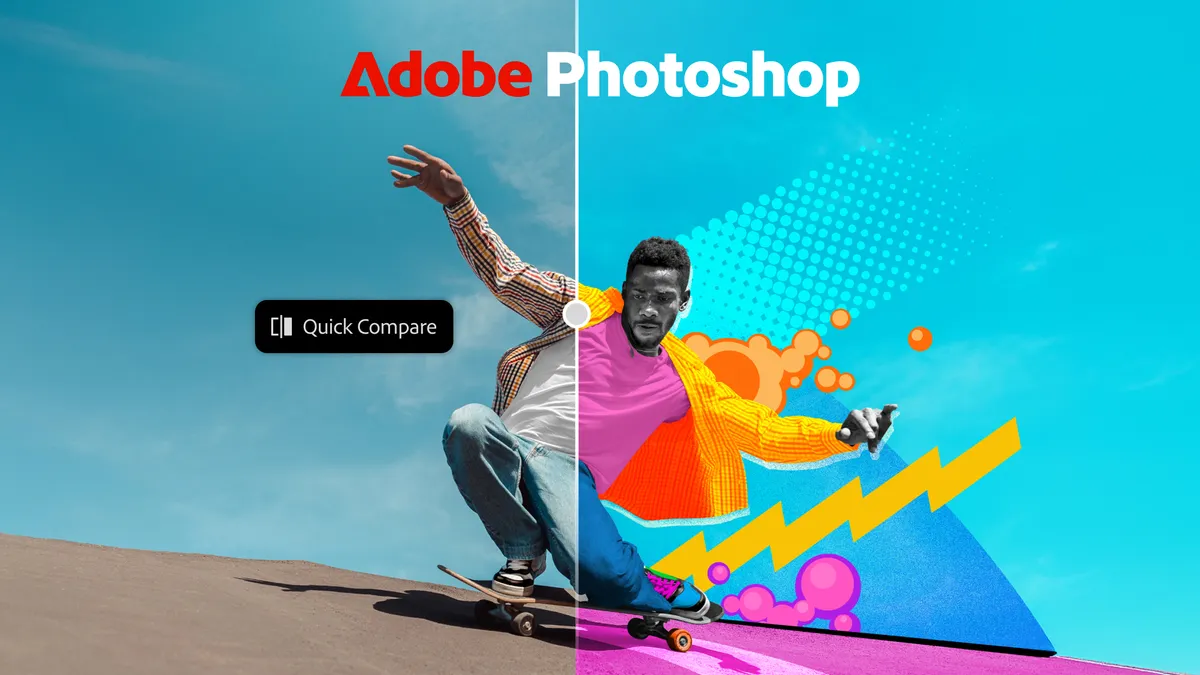
There are other improvements too, such as Quick Compare, an on-canvas split-screen slider for checking your edits against the original. And there's a new AI Assisted Editor: a simplified, prompt-led interface aimed at less experienced users, which you can swap for the full Pro Editor at any time. Adobe's conversational AI Assistant, however, is still confined to the separate Photoshop beta app, along with new tools such as Mockups and Camera Angles.
Photoshop costs $22.99 a month on an annual plan. Alternatively, you can get it with more than 20 other apps, including Illustrator, as part of Creative Cloud Pro for $69.99 a month (£66.49 in the UK). Photographers can save with the Photography plan ($19.99 a month), which bundles Photoshop with Lightroom. The cost is the main drawback, and casual users may struggle to justify it. But if image editing is central to your work, nothing else comes close.
The best graphic design software for vector editing

If you design logos, icons, illustrations or anything else that needs to scale without losing quality, Illustrator is the tool most professionals reach for. Its pen, shape and type tools are precise and mature, it works seamlessly with Photoshop, InDesign and the rest of Creative Cloud, and its files are what printers and clients most often ask for.
Like Photoshop, Illustrator has gained a raft of Firefly-powered tools. Text to Vector Graphic generates editable icons, scenes and patterns from a prompt, and now offers partner models alongside Adobe's own. Generative Shape Fill fills a shape with vector detail in your chosen style, Generative Recolor reworks colour schemes from a text description, and Generative Expand can extend artwork or create print bleed. Since the 2026 release, version 30, all of these live under a Generative AI button.
This release brought non-AI improvements as well, including a redesigned font browser, smoother gradients thanks to dithering and perceptual blending, and better snapping. There was something more experimental, too, in the AI-powered Turntable (beta), which generates views of flat 2D artwork from different angles.
The newest version, Illustrator 31.0, landed at Adobe MAX this month. Blends have got a long-overdue upgrade, with on-canvas easing handles, a persistent control panel and live preview. Concept to Vector turns sketches or photos into stylised vector illustrations, and text produced by Text to Vector Graphic can now be edited directly, rather than arriving as outlines. Adobe has also refreshed the built-in brushes, graphic styles, patterns and gradients, and added a Quick skill guide, which offers interactive lessons on shape, colour and type without leaving the canvas.
Illustrator is also one of the first apps to get Adobe's AI Assistant (beta), which carries out multi-step production tasks from simple prompts, such as organising layers or preparing artwork for print. And Adobe is previewing MCP integrations, due in early 2027, which will let third-party AI agents work directly on native Illustrator files on your computer, with layers and vectors kept editable.
Illustrator costs $22.99 a month on an annual plan, or comes as part of Creative Cloud Pro ($69.99 a month). As with Photoshop, the subscription is the sticking point for many, and if you use Pantone colours, you'll need a separate Pantone Connect subscription on top. But for professional vector work, it remains the industry benchmark.
The best free graphic design software

For years, Affinity's apps were the best-value alternative to Adobe's: professional tools for a one-off fee. Then, in October 2025, Canva (which bought developer Serif in 2024) made them even better value. It merged Affinity Designer, Affinity Photo and Affinity Publisher into a single app, called simply Affinity, and made it free to download for Mac and Windows. An iPad version followed this month, adding a Sketch Studio designed for touch and Apple Pencil.
Each set of tools lives in its own studio, and you can switch between vector illustration, photo editing and page layout within the same document. On the vector side, you get the Shape Builder, Contour and Stroke Width tools, live boolean operations and, since the 3.3 update in September 2026, a long-requested Blend Tool. For image editing, there are non-destructive adjustments, RAW development, focus stacking and panorama stitching, and the same update brought Affinity's biggest photography upgrade yet, with an improved RAW engine, batch imports and reusable looks.
Affinity also slots into Adobe workflows better than you might expect. It imports PSD, AI, PDF and SVG files, and native import of InDesign INDD files arrived in version 3.3. It's fast and light too, running natively on Apple silicon and Arm-based Windows machines.
Its approach to AI is more restrained than Adobe's. Generative fill and expand, background removal and other AI tools are available, but only with a paid Canva plan (Canva Pro costs $144 a year), and Canva says your content isn't used to train its AI. For automation, there's a Scripting Studio for running repetitive tasks with JavaScript, and paid Canva subscribers can connect Affinity to Claude Desktop to automate tasks with plain-language instructions.
So what's the catch? You'll need a free Canva account to download Affinity, and it isn't the industry standard, so if you work with agencies you'll still run into Adobe files and expectations. But more than seven million people have signed up since the relaunch, and for freelancers, students and hobbyists, it's very hard to argue with professional-grade design software that costs nothing.
The best graphic design software for UI

Figma has become the default tool for designing apps, websites and other digital products. It runs in the browser or as a desktop app on Mac and Windows, and its real-time multiplayer editing means whole teams can design, prototype and comment in the same file at once. Auto Layout, components and variables make it easy to build consistent design systems, and Dev Mode hands developers the specs and code snippets they need.
It's also become a much more capable all-round graphics tool. Figma Draw, launched in 2025, brought proper illustration features to the canvas, including brushes, a shape builder, lasso selection, text on a path, and texture and noise effects. Then at Config 2026 in June, Figma added Figma Motion (beta) for timeline-based animation, custom shader effects and fills, and Weave tools, which bring AI image tasks such as swapping backgrounds or changing aspect ratios into your design files.
The biggest change, though, is the Figma agent, which is now generally available on paid plans. You can ask it to generate and remix designs, automate repetitive work and give feedback on your layouts, and it can now create editable vector illustrations and icons too. It can even build custom generative plugins from a text prompt.
Figma's Starter plan is free, but limits how many files you can create. The Professional plan costs $16 per Full seat a month on annual billing ($20 billed monthly) and includes 3,000 AI credits a month, while the Organization and Enterprise plans cost $55 and $90 per Full seat respectively.
There's no CMYK support, so Figma isn't suitable for print work, and its vector tools still can't match Illustrator or Affinity for complex illustration. But if your work is mostly screen-based, and especially if you work as part of a team, Figma is the obvious choice.
FAQs
What's the difference between vector and raster editors?
Vector images are made of mathematically defined paths, so they can be scaled to any size without losing quality. That makes them ideal for logos, icons, illustrations and type. Raster images are made of pixels, which suits photos, digital paintings and detailed textures, but they lose quality when enlarged. Most design projects use both, which is why Adobe sells Photoshop and Illustrator together, and why Affinity combines them in one app.
Is Affinity really free?
Yes. The full app, including all its vector, photo and layout tools, is free for individuals on Mac, Windows and iPad, with no watermarks or time limits. You need a free Canva account to download it, and the AI features require a paid Canva plan.
Can I open Adobe files in Affinity?
Mostly, yes. Affinity imports PSD, AI, PDF, SVG and InDesign files, usually with layers and structure intact. Complex files may not translate perfectly, so if you swap files with Adobe users regularly, test a few typical projects first.
Should I get Photoshop and Illustrator separately or together?
Each costs $22.99 a month on an annual plan. If you need both, Creative Cloud Pro ($69.99 a month) adds more than 20 other apps, including InDesign and Premiere, plus a bigger allowance of generative credits. If you only need one, the single-app plan is much cheaper.
What computer do I need to run graphic design software?
Most modern Windows and Mac laptops can run all four apps on our list, as long as the operating system is supported. We'd recommend at least 8GB of RAM, and 16GB for the smoothest experience with large, layered files. Some of Adobe's newer AI features also benefit from a recent machine with a capable GPU. For recommendations, see the best laptops for graphic design.