It's been a long weekend of 3D printer deals hunting for me, and I don't know about everyone else, but I'm getting some serious deal fatigue. It can be pretty tough to decide what to buy during seasonal sales events like Black Friday - especially when you're flooded with options, offers and promotions galore.
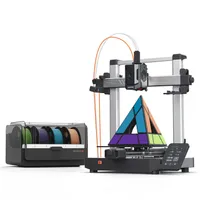
So to help cut through all the noise, I'm going to recommend just one 3D printer deal that is genuinely worth buying this Cyber Monday, based on my current experiences of using and testing it. I'm talking about the Anycubic Kobra 3 V2 Combo model, which is currently $170 off and down to just $329 for a very limited time.
This printer is perfect for beginners, and will soon be added to our list of the best 3D printers (my full review is pending). While I can confidently recommend this printer, I'd be lying if I said it was smooth sailing. I have had a handful of failed prints during my time with the Kobra 3, but the good parts definitely outweigh the bad, and just like all printers, most issues you run into can be swiftly overcome.
Example projects


Why is the Kobra 3 V2 a good choice for beginners?
3D printers are getting more affordable and more advanced at a rapid pace. And while this is very exciting, it can make it all the more tempting for beginners to jump in at the deep end and opt for the bigger and more intimidating Core XY machines.
In my opinion, a model like the Kobra 3 V2 Combo is super reliable and offers enough support for beginners with features to start printing right away, yet it still requires some hands-on operation. This is fundamental in helping newcomers to understand the basics of 3D printing and how these machines work. Bedslinger models are also designed to be a lot more desktop-friendly than the heavy, bulky enclosed units.
Having a printer that will automate every step for you sounds great on paper, but it will actually make things harder in the long run when you need to perform maintenance on your machine or diagnose issues and have no idea how to. Sure, YouTube videos can help with general troubleshooting, but it's better to be able to deal with errors yourself and get confident making adjustments to your printer.