The best Photoshop alternatives don't just match Adobe's industry standard software, but in some ways exceed it. There are plenty of digital art and photo editing programs offering features that Photoshop doesn't, from digital painting tools to the simple option to buy the software up front rather than subscribing.
In this guide, we've outlined the top Photoshop alternatives based on our testing and hands-on reviews. Our number-one pick is currently Affinity by Canva, an outstanding program for photo editing which is now completely free. But there are plenty more specialised options to consider.
We've focused here mainly on desktop software, but if you're purely interested in editing on mobile, see our roundup of the best photo apps. Some of the programs on our list are only available for certain platforms like Windows or Mac OS – we have specified where this is the case.
The best Photoshop alternatives
Why you can trust Creative Bloq Our expert reviewers spend hours testing and comparing products and services so you can choose the best for you. Find out more about how we test.
Best Photoshop alternative overall

Canva made the bold move last year of making its newly acquired software, Affinity, completely free. It used to be a one-off cost but now costs absolutely nothing. But that in itself is meaningless if the software isn't up to scratch. Thankfully, Affinity is packed with fantastic features and tools.
From its interface to its range of features, Affinity is the closest thing to Photoshop that we've seen yet. Aimed squarely at professional photographers and designers, it's also fully compatible with Photoshop and other file formats. And again, it's free.
There are no AI tools on offer, even denoising, unless you fork out for a Premium Canva subscription. There is object selection though, which is very useful, though not perfect. We found Photoshop's object selection tool did a better job of picking out a bird against a blue sky in our tests.
Most photo editing is non-destructive, and works in a way that's very similar to Adobe. There are no photo organising or cataloguing abilities though, which may put off photographers, who will need a separate app for that.
Affinity is available for both Mac and Windows. If you're looking for a free yet brilliant alternative to Photoshop, Affinity is definitely worth investigating.
See our full Affinity by Canva review for more details.
Best Photoshop alternative for digital painting

If it’s a painting app for iPad you’re looking for, we highly rate Procreate. What started out as a basic drawing app back in 2010 has transformed over the years into a highly professional tool; so much so, it's even bagged itself a couple of Apple Design Awards.
Our testing found that the easy-to-use layout is packed with features artists will love, from true-to-life pencils and inks to advanced layer compositing and unique digital tools. Added palm support means you no longer have to worry about accidentally drawing over your canvas, and an ever-growing library of Procreate brushes will help you add flair to your artwork.
Procreate has full support for both first- and second-generation Apple Pencils, depending on your iPad model. And since 2019, there's been a dedicated iPhone version named Procreate Pocket. Newer versions have also seen an improvement in 3D painting tools (and animators should check out the newly updated Procreate Dreams app). If you want to use it but haven't bought an iPad yet, read our guide to the best iPads with Procreate.
You won't find all the features you'd expect from Photoshop for editing photos here, but for digital painting specifically, you'll have at least most of what you need. There’s a free handbook on the Procreate website, featuring an overview of all the app's features and tools, to help get you started.
For more information, read our complete Procreate 5.3 review.
Best cheap Photoshop alternative for AI

We've found Skylum's Luminar Neo to be a capable Photoshop alternative on various fronts, as it offers many of the same excellent photo editing tools, and seems to be designed specifically for photographers. In our Skylum Luminar Neo review, we focused on the generative AI tools that have been added, and found that overall, they were comparable to Photoshop's offerings.
The most reliable of these offerings is the GenExpand tool which allows you to expand your canvas, with the extra parts being filled in by AI. Our reviewer did point out though that the AI tools available were already available in other photo editors, so he wouldn't recommend getting Luminar Neo over Photoshop overall, but did think Luminar Neo was worth upgrading for existing users.
Best Photoshop alternative in-browser

Thanks to continual advances in web technology you don't always need a discrete app to do much of what you'd use Photoshop for. Photopea, which runs in the browser, is a case in point.
Designed to be an advanced editor with pro tools, it bears a distinct resemblance to Photoshop and features most of the tools you'll need for everyday image work. It'll open most standard file formats such as JPG, PNG and RAW, and it'll accept Sketch, GIMP and even Photoshop PSD files.
Photopea supports layers and layer masks, lets you use blend modes, and features a stack of selection tools, from standard marquees through to a magnetic lasso and a quick selection tool. While it doesn't offer the sort of advanced features you'd expect in Photoshop, such as content-aware fill, it still has a more than enough going on to keep most designers and artists happy, and it's completely free to use.
On the downside, it comes with ads, although paying for the premium version gets rid of them, and gives you extra AI credits.
Best Photoshop alternative for photographers
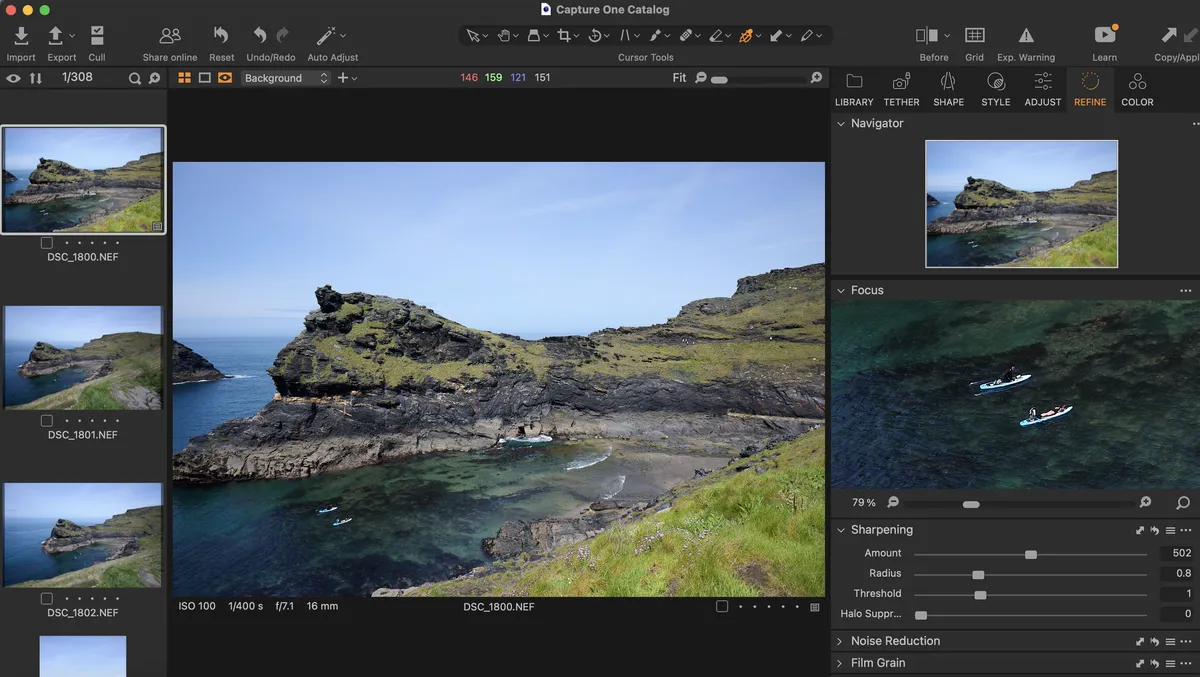
Another Photoshop alternative that's bravely flying the flag of one-time-purchase rather than pivoting to the subscription model, Capture One Pro is a fully featured piece of software that's well-suited to professional and serious enthusiast photographers. It's one of the go-to programs used by in-house studio photographers, in part due to its excellent tethering tools, allowing you to control camera settings and fire the shutter directly through the software. This is great when you're making fine-tuning adjustments to a studio setup.
As we noted in our review, Capture One Pro is one of the most capable RAW processors in the business, with a broad spectrum of options for advanced color work. It also offers a suite of image management tools to rival Lightroom's, with import and cull options that make it easier to manage large batches of shots. Bulk-tagging is intuitive, and the software works cleverly with face-detection technology to automatically zoom in on faces so you can check whether they're sharp – and discard if not.
This isn't a cheap option, though the cost does at least all hit at once, rather than bleeding you every month for the rest of your life. Capture One Pro also offers a 30-day free trial, with no automatic renewal at the end, meaning there's no downside to giving it a spin and seeing if it works for you.
Read our full Capture One Pro review to learn more
Best Photoshop alternative for realistic art

ArtRage is another great option for those looking for digital painting that can pass for the real thing. It offers realistic oils, pencils, watercolour, canvas textures and other traditional media painting tools, many of which are fully customisable, replicating an old-school art studio in digital form.
Its makers say that ArtRage is "a canvas for thick, expressive oils and delicate watercolors, a sketchpad with a full set of pencils, and a sheet of paper with a stack of wax crayons all in one."
The latest version, ArtRage Vitae, is available for Windows and macOS. Our reviewer found it does a great job in allowing to to virtually smear and blend thick oils to create natural colour gradients; sketch with pencils and shade with the edge of the tip; and create delicate watercolor strokes that react to canvas texture. Like most visual editing software, there are layers, blend modes, guides, grids, and perspective layout tools, and you can also use photos as references if you choose.
If you’re new to digital painting and looking for an affordable, intuitive program, ArtRage is an option seriously worth considering. The software is also available for iOS and Android, although you pay for those apps separately.
Check out our Artrage Vitae review to find out more.
Best free Photoshop alternative for painting

If you're after free software for digital painting, Krita is an excellent Photoshop alternative. As an open source program, it's been created by artists who want to give others access to quality, affordable software. And they've focused on tools they know artists want and need.
When we reviewed it, we were particularly impressed by the brush tools – there are 100 brush types, nine brush engines, and a brush stabiliser. Krita allows you to work on multiple layers and the interface is very similar to Photoshop, so users familiar to Adobe's software will find this easy to master.
However, our test found that as a digital painting program, Krita does lack some of the specific photo editing features of Photoshop. For more details, see our full Krita 5.0 review and our roundup of Krita tutorials.
Best Photoshop alternative for UI and UX

Sketch is a professional vector graphics app for creatives that's created a huge buzz within the design community, and among web designers in particular, since its launch in 2010. It's very flexible, supporting infinite zooming and vector shapes for multiple resolutions. You can build a new graphic from primitive shapes, or start a new one with the Vector or Pencil tool.
We've found Sketch to have a pleasingly simple UI and many features similar to those of Photoshop and Illustrator, including layers, gradients, colour picker and style presets. Its popularity means there are also plenty of community-created Sketch plugins you can use to extend its functionality.
A few years ago we saw a flurry of new features added to Sketch. These include improvements to real-time collaboration; in particular, developers can now view, inspect, and measure designs in any browser, on any operating system, all for free. Also, new document permissions allow designers to limit who can edit specific designs. Read our Sketch 2021 review for more.
More recently, Sketch has become now available on the web and on iOS, rather than just for Mac.
Best free Photoshop alternative for image editing

A free, open-source Photoshop alternative, GIMP has been around for years (the name stands for GNU Image Manipulation Program, if you're wondering). Today it's available for Linux, Windows and Mac.
We think GIMP offers a wide toolset, similar to Photoshop in many ways, and is a great option if you're looking for a no-cost image editor. Our testing concluded that the interface differs somewhat from Photoshop, but there is a version available that mimics Adobe's look and feel, making it easier to migrate over if you're ditching Photoshop.
The full suite of tools includes painting tools, colour correction, cloning, selection, and enhancement. We find it ensures good compatibility too, so you'll be able to work with all the most popular file formats. You'll also find a very capable file manager built in, along similar lines to Adobe's Bridge.
As open source software, GIMP is constantly being improved, so if you tried GIMP before and didn't like it, it may be worth taking a second look. See our GIMP review for more details.
Free Photoshop alternative for Macs

Pixelmator Pro has had an upgrade and is now part of Apple's Creator Studio, though the Mac app can also be bought as a standalone. It brings together a photo editor, illustration and painting tool in one place. It offers non-destructive image editing, and supports features like tabs, fullscreen and split view.
The interface is nicely minimalist and so won't be confusing for newbies. There are plenty of great templates to work with, making it ideal for beginners, and there are the features you'd expect from Photoshop in terms of image editing, adjustable brushes, masking and layering. There are also AI features such as automatic background removal and Super Resolution for upscaling images.
However, in our tests we found some of the brushes lack pressure sensitivity and we weren't able to turn the canvas, like you can in Procreate.
If you're already thinking of signing up to Apple Creator Studio then Pixelmator Pro is a great shout, but if you're wanting a standalone act, we'd probably recommend Procreate or Affinity over Pixelmator Pro.
Read more with our Apple Creator Studio review.
Also tested
FAQs
What are Photoshop alternatives?
Photoshop alternatives are software applications that provide image editing capabilities similar to Adobe Photoshop. They are designed to offer users alternative options for graphic design, photo editing, and other creative tasks. This does NOT mean, however, that they work in exactly the same way as Photoshop or replicate all, or even the majority of its features.
Why should I use a Photoshop alternative?
Alternatives to Photoshop are mainly popular for one reason: cost. Photoshop subscriptions are very expensive, and Photoshop alternatives are usually cheaper and available for a one-off payment. They may even be free, or have a free tier. Some Photoshop alternatives have a simpler interface, so they're easier to pick up and learn for those who don't require the full range of Photoshop's capabilities. Finally, some Photoshop alternatives have features that are not found in Photoshop, such as Affinity's one million-plus per cent zoom.
Can I use Photoshop alternatives for professional graphic design?
Photoshop may be the industry standard for graphic design, but it's no longer an absolute must-have for freelancers to use. These days, many commercial projects are completed using other software such as Affinity and Sketch.
Is there a free Photoshop alternative?
Yes – GIMP is an alternative to Photoshop that is free and open-source. While it doesn't have the latest AI-powered features, it does have a community of committed enthusiasts keeping it up to date with new tools and functionality. It's also much easier to use than it used to be, and while it's not as powerful as Photoshop, it's a fine choice for general photo editing and design work.
How to choose Photoshop alternatives
When choosing between Photoshop alternatives, first decide what you need the software to do. For example, if it's just simple enhancements to images you require, there are an endless supply of free photo apps to choose from. If you want more sophisticated digital painting or graphic design features, though, the software on the list above will prove more capable.
Beyond that, you'll need to think about which platform you wish to work on. For instance, many Photoshop alternatives either only work on Macs or Windows. Also decide how much money you want to spend. Most Photoshop alternatives are cheaper than Photoshop itself, but generally the more you spend, the more features you'll get.
How we test Photoshop alternatives
At Creative Bloq, we have years of collective experience in testing software, and so we're rigorous in putting Photoshop alternatives through their paces. We'll examine core image editing features and scrutinise tools such as layers, filters, and color correction to ensure they perform as expected.
We'll also check compatibility with common file formats, such as JPEG, PNG, and PSD, to ensure they can actually integrate into designers' and artists' existing workflows. We assess the interface to make sure that it's easy to understand and learn, and evaluates the software's speed, responsiveness, and stability to make sure it works quickly, smoothly and without crashes.
Parts of this article were originally published in ImagineFX, the world's best-selling magazine for digital artists. Subscribe to ImagineFX.