Our Verdict
The Acer Chromebook 311 (C725) is a budget-friendly laptop that excels when it comes to durability and battery life. The MIL-STD 810H military-grade certification and modular, easy-to-repair design make it a standout for longevity (and ability to survive schoolchildren). Unfortunately, Acer had to cut some corners somewhere, and that comes in CPU power, display resolution, and webcam quality. Ultimately, it serves best as a portable, distraction-free companion tool for basic tasks like writing, light photo editing, or digital crafting rather than a primary workstation for heavy creative professional use.
For
- Rugged portability
- All-day battery life
- Dependable ChromeOS experience
- Good connectivity for a Chromebook
Against
- No touchscreen
- Tiny hard drive
- Hardware resources will need careful management
Why you can trust Creative Bloq Our expert reviewers spend hours testing and comparing products and services so you can choose the best for you. Find out more about how we test.
The Acer Chromebook 311 (C725) was released at the beginning of 2026 with the school market in firm view. Thanks to its MIL-STD 810H military-grade durability, the Chromebook is perfect for students who might not be as careful as if the laptop were their own.
But this isn't the only group of people that the Chromebook 311 will appeal to. With a power-efficient MediaTek Kompanio 540 processor, all-day battery life, and a modular serviceable design, this is a laptop that delivers the much-loved ChromeOS experience to anyone wanting all-day use and control over repairs.
There's very little chance of it featuring in our guides to the best laptops for graphic design or the best laptops for video editing. That said, I still found it to be an invaluable companion tool for a range of creative tasks, including photo and video editing, writing, podcast creating, and even digital crafting.
Key specifications
CPU: |
MediaTek Kompanio 540 |
Graphics: |
Integrated ARM Mali-G52 |
Memory: |
4GB |
Storage: |
32GB |
Screen size: |
11.6 inches |
Screen type: |
LCD HD IPS |
Resolution: |
1366 x 768 px |
Refresh rate: |
60 Hz |
Brightness: |
250 nits |
Ports: |
2x USB-C, 2x USB-A, 3.5mm Jack |
Wireless connectivity: |
Wi-Fi 7; Bluetooth 5.3 |
Dimensions: |
290 mm x 206 mm x 18.8 mm |
Weight: |
1.2 kg |


Design, build and display
• Impressive rugged durability
• A basic display which is probably outdone by your smartphone
The Acer Chromebook 311 boasts an impressive MIL-STD 810H military standard certification which, despite being established by the U.S. Department of Defense, has actually become the standard for certifying consumer electronics. We don't see this certification very often on laptops, which shows how keen Acer is to distinguish the 311.
An MIL-STD 810H certification demonstrates the device's ability to be dropped from a desk without damage as well as its ability to withstand vibration, sand, dust, and extreme temperatures. This makes it a great solution for digital crafters operating in a workshop, creatives working in the field, and anyone who wants the liberty of not caring about how they treat their device.
The 11.6-inch display has a limited 1366 x 768 pixel resolution, and there are no colour accuracy specs in sight. Please don't buy it thinking you can use it for colour grading photos or videos, or showing your work off to clients. If you do, that might just be your very last client. It really is only sufficient for reading, web browsing and word processing, though it won't look as sharp as a 1080p smartphone or larger laptop.
The IPS panel works well at wide viewing angles and has an anti-glare matte finish called "ComfyView" that is specifically designed to reduce reflections, helping to prevent squinting and eye strain. Unfortunately, the model I tested didn't have a touchscreen, which limits its usability for creatives.
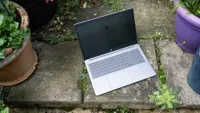
The 311 is far from good-looking, with Acer choosing durability over aesthetics. The keyboard panel with rubber surround is strangely attractive, but the display panel is unfortunately as ugly as it gets. This is on account of the thick frame that surrounds the 11.6-inch panel. In fact, it reminds me of the large surrounds featured on old CRT monitors. Sorry, Acer.
Design score: 3/5

Features
• A good level of connectivity for a Chromebook
• Sustainability and rapid repairability
Acer has done a fantastic job with connectivity, opting for two USB-C ports and two USB-A ports, spread evenly across the left- and right-hand sides of the keyboard panel. This provides the necessary options to support new and old peripherals without requiring a docking station. There's also a 3.5mm audio jack thrown in for good measure.
Beyond physical ports, the 311 is equipped with Wi-Fi 7 and Bluetooth 5.3, providing future-ready wireless speeds and stable connections, whatever you're connecting to. As a result, you'll have no problems staying connected whether you're at home, in the workshop, or working remotely.
Another interesting feature is the dual camera setup, one at the front and one at the back. The front-facing 1080p Full HD camera is located above the screen and, despite "Temporal Noise Reduction", remains pretty poor, even in good lighting conditions. At the back, there's a 5MP world-facing camera for those situations where you want to capture what's in front of you while still using the laptop.
Aside from all this, what sets this Chromebook apart from its predecessors and competitors is its focus on sustainability and rapid repairability. The modular design has a serviceable keyboard that can be replaced by removing just two screws and modular USB-C ports that allow for quick fixes. This feature won't be for everyone, but if you're regularly in a workshop environment, then being able to fix the device after a knock will reduce downtime.
Feature score: 4/5

Performance
• Sluggish performance across the board
• Display and webcams lack definition and quality
The Acer Chromebook 311 runs ChromeOS, a lightweight operating system centred on Google's suite of apps. Unfortunately, the MediaTek Kompanio 540 CPU and integrated ARM Mali-G52 graphics struggle to cope even with this. Performance was sluggish with a small but annoying second or two of delay on most operations, including launching, using, and switching apps.
I wasn't expecting anything groundbreaking, but I was expecting more from the processor. The inclusion of a MediaTek CPU is a shift away from traditional Intel chips to prioritise extreme power efficiency and silent, fanless operation, but unfortunately, this has come at the cost of performance.
The main webcam isn't much better, with a low-resolution, grainy image that lacks definition. It also couldn't handle extreme light, such as lamps or windows. Thankfully, the front-facing camera is a little better, although still unlikely to be as decent as your smartphone.
More positively, the Chromebook is incredibly quiet, boasts a comfortable typing experience, and has had no WiFi dropouts during my time testing it. On top of this, and maybe the biggest saving grace, is the impressive battery life. Despite not being able to achieve the advertised 15 hours of battery life, the more realistic nine to ten hours of life that it realistically serves up is enough for a full day's work before popping it onto charge overnight.
The Chromebook 311 was never going to be a powerhouse, but I did expect a little more from it. If your budget is tight and you're happy with a slower-than-optimal app responsiveness, then you'll be hard-pressed to find anything better at this price.
Performance score: 3.5/5
Price
The Acer Chromebook 311 is a budget-friendly device that is affordable for a wide range of users, including students who might be on a tight budget. The UK cost is £299, and in the US it's $499.99. At this price it won't be too difficult to justify as a companion device.
Value score: 4.5/5

Who is it for?
• A companion tool for creatives
What the Chromebook 311 lacks in raw power, it more than makes up for in usability and portability. This makes it a fantastic companion device for creatives who carry out light photo editing, basic video editing, sketching, podcast recording, writing, digital crafting, etc.
Attributes |
Notes |
Rating |
|---|---|---|
Design: |
A military-grade laptop with an ugly display panel. |
3/5 |
Features: |
Fantastic connectivity and repairability. |
3.5/5 |
Performance: |
Fast and responsive, but remember that ChromeOS is limited. |
3.5/5 |
Value: |
Cheap and affordable as a companion laptop. |
4/5 |
Buy it if...
- You need a distraction-free writing and concepting experience
- You're into digital crafting and need an affordable laptop
- You crave all-day battery life
Don't buy it if...
- You plan on storing lots of files locally. The 32GB hard drive won't last long.
- You need colour accuracy and high resolution.
- You want flowing performance with no bottlenecks.
Also consider