The best computer for graphic design provides the hardware to run creative software quickly and efficiently. Photoshop, Illustrator and InDesign require a lot of processing power; 3D rendering and video editing even more. You'll also want plenty of RAM, fast storage and reliable connectivity.
We've tested and assessed desktops across a wide range of budgets to find the best options at every level. Our top pick is the Mac mini (M4, 2024), which offers exceptional performance, compact design and outstanding value. We've also included the best Windows desktop, a budget mini PC, a dedicated all-in-one and a professional workstation for the most demanding workflows.
Need a monitor too? See our guide to the best monitors for graphic artists, or our roundup of the best laptops for graphic design.
The best computer for graphic design
Why you can trust Creative Bloq Our expert reviewers spend hours testing and comparing products and services so you can choose the best for you. Find out more about how we test.
Best computer for graphic design overall

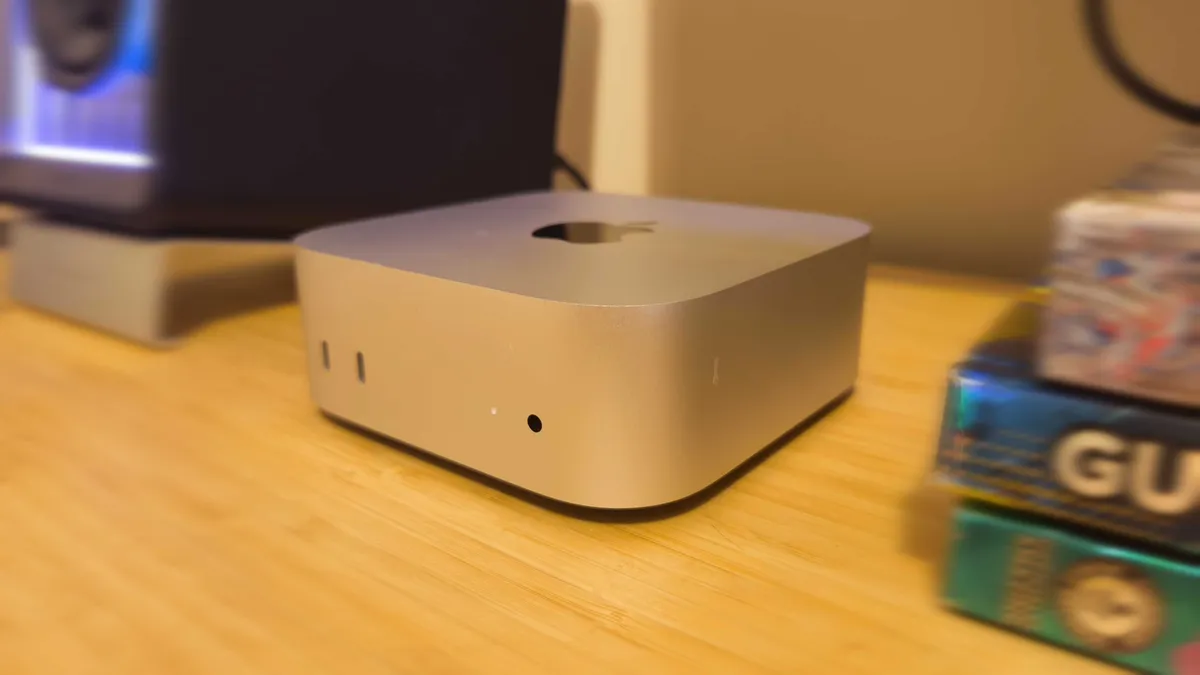
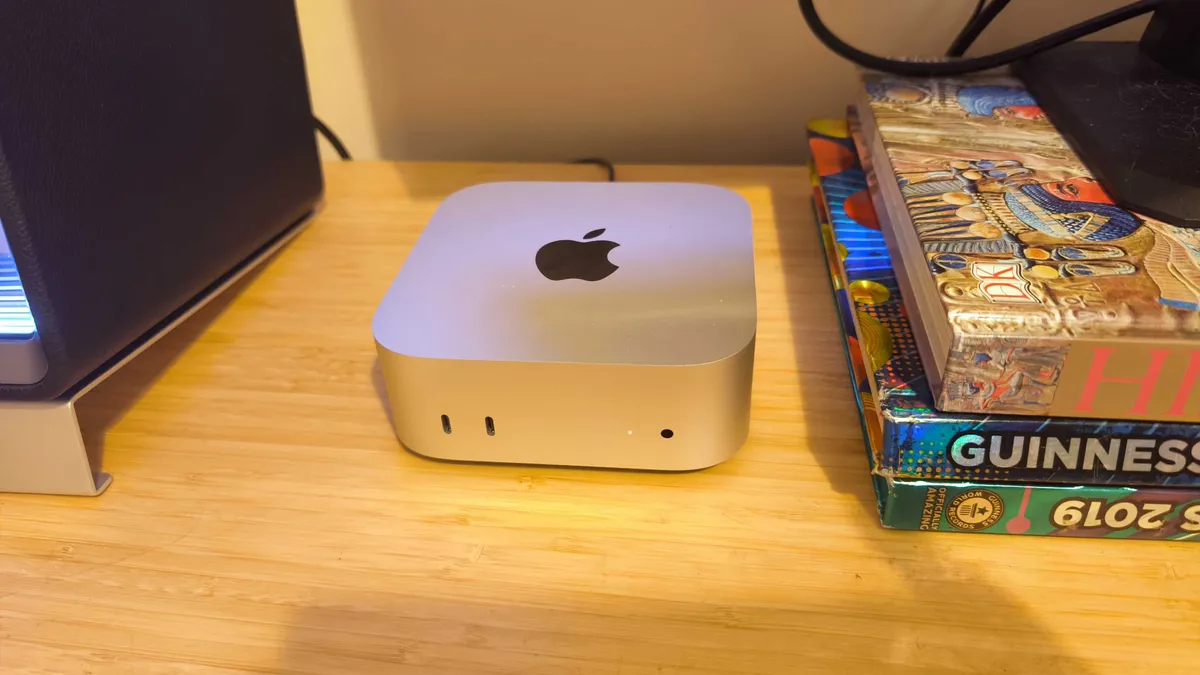
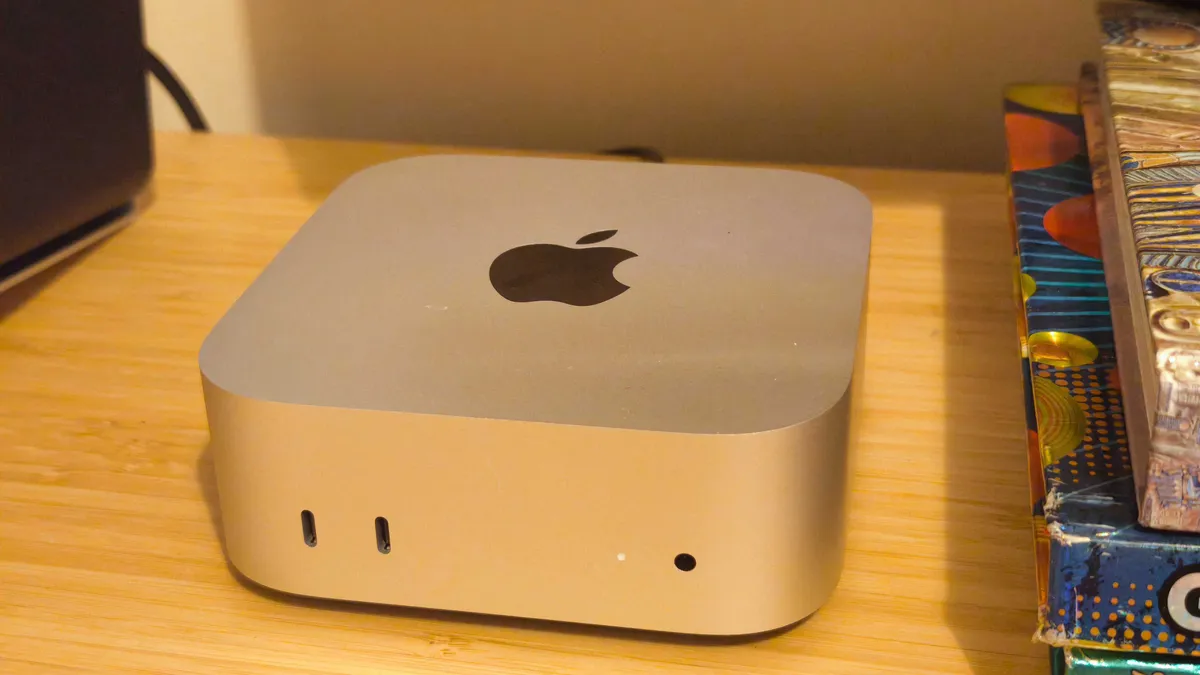


30-second review: The Mac mini (M4, 2024) is our top overall choice. It runs every major design application beautifully, stays near-silent under load, takes up almost no desk space and starts at a price that undercuts Windows alternatives. The base model's 16GB of unified memory handles everyday creative workflows without strain; step up to the M4 Pro for large 3D files, multi-cam RAW video or complex compositing. The one concession is that you'll need to buy a monitor, keyboard and mouse separately.
Price, value & competition: The Mac mini M4 starts at $599 / £599, making it by some distance the most affordable in this roundup. Apple's pricing aligns closely between the US and UK, which is unusual for hardware at this level. Common street prices sit at or very close to MSRP; discounts are rare, though Apple's refurbished store occasionally lists certified models at a modest reduction. The M4 Pro variant starts at $1,399 / £1,399 and adds a 12-core CPU, up to a 20-core GPU and double the maximum unified memory, making it excellent value for professionals who genuinely push the hardware. The closest competitor at the base price point is the Geekom A9 Max ($1,199 / £999), which offers more RAM and storage as standard but costs significantly more, runs Windows rather than macOS and lacks the Mac mini's level of system-level software integration.
Performance: The M4 chip is fast in a way that quickly becomes unremarkable, which is the best kind of fast. The neural engine provides snappy, responsive performance across Photoshop, Illustrator, InDesign, Affinity Publisher, Figma and DaVinci Resolve. Our reviewer encountered no stutter, no fan noise and no slowdown even when running multiple GPU-intensive applications simultaneously. The M4 Pro configuration adds meaningfully more GPU cores and greater memory bandwidth, which is noticeable in 3D rendering, RAW video processing and large Photoshop documents with many adjustment layers. For pure 2D design work, the base M4 is more than sufficient.
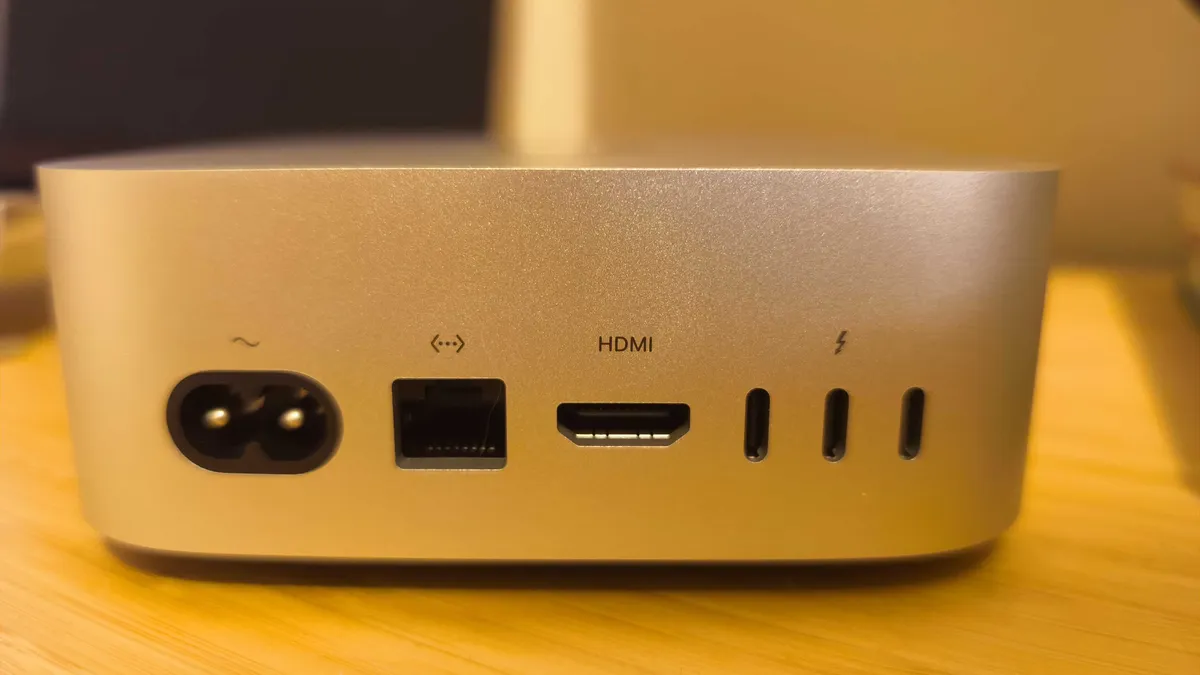
Design: The Mac mini is 127 x 127 x 50mm, making it more compact than predecessors, and the all-aluminium silver chassis is immaculate. The addition of front-facing USB-C ports and a headphone jack is a useful change, too: connecting a portable drive or audio interface is now a matter of reaching forward rather than groping around the back. Rear connectivity includes three Thunderbolt 4 ports (Thunderbolt 5 on the Pro model), two USB-A ports, HDMI 2.1, Gigabit Ethernet and a 3.5mm jack. The power button sits on the underside, which is mildly irritating at first and quickly forgotten. A VESA mount adapter is available separately for those who prefer to keep the unit out of sight.
Read more: Mac mini (M4) review
Best Windows computer for graphic design

30-second review: The 2026 HP Omen 35L is a gaming desktop that doubles convincingly as a creative workstation thanks to NVIDIA's Blackwell-architecture RTX 5060 Ti, particularly in its 16GB VRAM variant. This brings genuine GPU capability for creative work at a price previously occupied by higher-end cards. Pair it with the Intel Core Ultra 7 265F and you have a fast, expandable Windows desktop that handles everything from Photoshop and Premiere Pro to Blender GPU renders with room to spare. The aesthetic leans firmly into gaming territory, but if that doesn't bother you, this is the Windows desktop to buy.
Price, value & competition: The Omen 35L starts from around $1,399 / £1,399 in its base configuration (Core i5, 8GB RTX 5060 Ti, 16GB RAM, 1TB SSD). The recommended configuration for creatives, with the Intel Core Ultra 7 265F, RTX 5060 Ti 16GB and 2TB of storage, carries a US MSRP of approximately $1,999; UK pricing for this configuration is available directly through HP and major retailers. Street prices on lower-spec models are often discounted, particularly at Currys in the UK. The closest direct competitor is the Alienware Aurora, which offers comparable GPU options at a similar price but with less upgrade flexibility. Against the Mac mini M4 Pro ($1,399 / £1,399), the Omen 35L delivers superior raw GPU performance but loses out on efficiency and software integration.
Performance: In GPU-dependent creative tasks, the RTX 5060 Ti 16GB is the standout feature. NVIDIA's Blackwell architecture brings significant AI-processing improvements over its predecessor, and tools that leverage DLSS 4 or NVIDIA's AI-denoising capabilities, including Topaz products, Adobe's AI filters and Blender's Optix denoiser, benefit noticeably. CPU performance from the Core Ultra 7 265F is strong: 20 cores handle multitasking across heavy applications without complaint, and multi-core rendering results in Cinebench and Handbrake put it firmly among the faster consumer desktop chips available.
Design: The Omen 35L is a microATX tower measuring approximately 210 x 408 x 410mm, available in black or white. The transparent side panel puts the RGB-lit components on display; the internal layout is clean, with tool-less access to RAM and drive bays that makes upgrading straightforward. Front I/O provides two USB-A 5Gbps ports and a USB-C 10Gbps port, alongside a headphone/microphone combo jack. Rear ports include four USB 2.0 Type-A, two USB-A 5Gbps, one USB-C 10Gbps and three 3.5mm audio jacks, plus the GPU's display outputs. The notable absence is Thunderbolt 4, which limits high-bandwidth external storage and display options, and is worth weighing carefully if you rely on Thunderbolt peripherals.
Best value computer for graphic design


30-second review: The Geekom A9 Max is excellent value for creatives whose work does not regularly demand a discrete GPU. It packs AMD's flagship Ryzen AI 9 HX 370 processor, 32GB of upgradeable DDR5 RAM and a 2TB SSD into an aluminium chassis barely larger than the Mac mini, for $1,199 / £999. Photo editing, illustration, print layout and UI design all run without friction, and the 80 TOPS of AI acceleration built into the processor means AI-assisted tools in Adobe and Affinity applications respond quickly. On the downside, the fan becomes audible under sustained load, and the absence of a discrete GPU rules it out for heavy 3D work or GPU-accelerated rendering. Within those limits, though, it's superb value.
Price, value & competition: The A9 Max comes in a single configuration: $1,199 / £999, including 32GB DDR5 RAM and a 2TB SSD. That price includes more memory and storage than any other machine in this roundup at its cost. The UK price of £999 is particularly competitive. RAM and one of the two SSD slots are user-upgradeable, adding future-proofing that the fixed configurations of Apple computers can't match. Its natural competitor is the Mac mini M4 ($599 / £599), which starts at roughly half the price, offers a quieter and more polished experience and integrates better with macOS, but ships with 16GB RAM and 256GB storage as standard. For Windows users who need 32GB and 2TB out of the box, the A9 Max is better value than a comparably configured Mac mini. The Asus NUC 15 Pro+ ($1,199 / approximately £1,099) is also worth comparing, with similar performance at a similar price.
Performance: The Ryzen AI 9 HX 370 is a strong performer in CPU-bound creative tasks. In Geekbench multi-core and Cinebench 2024 tests it keeps pace with the Asus NUC 15 Pro+ and trails the Mac mini M4 Pro, while staying comfortably ahead of most mid-range productivity laptops and midrange desktops. PugetBench for Photoshop results are impressive for a system without a discrete GPU. The Radeon 890M integrated graphics is the best iGPU available in a mini PC of this class: capable of smooth 4K output across up to four displays and light 3D viewport work at lower resolutions. For GPU-accelerated rendering or video effects work, the integrated GPU is a hard ceiling, and there is no upgrade path to a discrete card in this chassis.
Design: Measuring 135 x 132 x 47mm and weighing 570g, the A9 Max is among the most compact desktops available. The full-metal aluminium chassis has a clean, minimalist appearance that sits close to the Mac mini in character, though the ventilation grilles around the edges and the row of four front USB-A ports give it a more functional feel. Build quality is excellent throughout: the chassis feels solid and substantial. Port provision is exceptional for the size: four USB-A 3.2 Gen 2 ports and a 3.5mm jack on the front; a USB-A, two USB4 ports, two HDMI 2.1 outputs, dual 2.5GbE Ethernet and the DC power input around the back; and an SD 4.0 card reader on the left side. A VESA mount bracket is included in the box, and Wi-Fi 7 with Bluetooth 5.4 handles wireless connectivity.
Best all-in-one computer for graphic design

30-second review: If you're looking for an all-in-one machine, the HP OmniStudio X 27 has a lot to offer. A discrete NVIDIA RTX 5050 GPU gives it dedicated graphics capability that few integrated desktops can match. And LG's Neo:LED panel technology promises to deliver 100% Adobe RGB and 100% DCI-P3 coverage on a 27-inch screen at 450 nits: more accurate colour rendering than many professional external monitors. It is not the most powerful computer here, and the RTX 5050 is entry-level, but as a complete, colour-accurate all-in-one workstation for 2D and light creative work, it's pretty impressive.
Price, value & competition: HP sells two OmniStudio X 27 lines, so be careful when pricing this up. The standard models use a conventional IPS panel with no discrete GPU and start at around £1,249 / $1,100 at Currys and other retailers. The premium Neo:LED configuration with the RTX 5050, however, starts at $1,499 / £1,249.99: this includes the display, stand, keyboard and mouse. The closest rival is Apple's iMac 24-inch (M4) from $1,299 / £1,299, which offers an excellent display and refined macOS experience, though in a smaller 24-inch format and without a discrete GPU.
Performance: The Intel Core Ultra 7 356H is a 16-core processor that handles Photoshop, Illustrator, InDesign and Figma without difficulty and manages light video editing in Premiere Pro at 1080p comfortably. The RTX 5050 with 8GB of GDDR6 adds meaningful GPU acceleration where applications support it: AI filters in Photoshop, GPU-assisted exports in Premiere Pro and light GPU rendering in Blender all run faster than on integrated-only systems. This is not a computer for heavy 3D production or broadcast-grade colour grading, but for print, brand, UI and photography workflows it's well-suited. The PCIe Gen5 NVMe SSD makes file access and application launches quick throughout.
Design: The OmniStudio X 27 measures 614 x 185 x 519mm at maximum stand height, with a four-sided borderless panel achieving a 98% screen-to-body ratio. The Eclipse grey finish is restrained and professional. The stand is fully height-adjustable, which is a practical advantage over all-in-ones with fixed or tilt-only stands, and the 5MP IR camera tilts to support Desk View for presentations. Rear connectivity includes two Thunderbolt 4 USB-C ports (40Gbps), three USB-A 10Gbps ports, HDMI 2.1 out, a headphone/microphone combo jack and an RJ-45 port. A single USB 2.0 port on the underside handles keyboard and mouse dongles, and Wi-Fi 7 and Bluetooth 6.0 are standard. The quad-speaker audio system delivers clear, well-balanced sound, too.
Most powerful computer for graphic design

30-second review: The Dell Pro Max Tower T2 is a workstation rather than a desktop, and the distinction matters. Where consumer-focused computers balance price, size and performance, the T2 prioritises reliability, certifiability and scalability. It starts at a modest base configuration and Dell's online configurator allows you to build upwards, through professional RTX Pro GPUs with up to 96GB of VRAM, ECC memory and PCIe 5.0 storage, into a machine capable of handling the most demanding professional creative pipelines. The clean, serviceable chassis is built for longevity rather than aesthetics, and Dell's ProSupport programme provides workstation-grade service cover. If your work has genuinely outgrown consumer hardware, this is the computer to upgrade to.
Price, value & competition: The Dell Pro Max Tower T2 starts at $1,412 / £2,009 in its base configuration, which includes a mid-range CPU, integrated graphics, 8GB of RAM and a 256GB SSD: functional but modest. When configured for serious professional creative use, with the Core Ultra 9 285K, an RTX Pro 4000 or above, 64GB of ECC RAM and 2TB PCIe 5.0 storage, prices rise substantially. The configuration with 128GB RAM and an RTX Pro 6000 GPU reaches around $14,000. Direct competitors include the HP Z2 Tower G1i and Lenovo ThinkStation P2 Tower Gen 2; pricing at the level is typically negotiated through business accounts rather than retail, and varies by region and configuration.
Performance: In testing, the Core Ultra 9 285K's single-core performance is among the strongest of any desktop processor currently available, which benefits applications that do not scale efficiently across many cores, such as Photoshop and Illustrator. Multi-core tasks such as video transcoding and Cinebench rendering place the T2 behind massive-core-count workstation CPUs such as AMD's Threadripper, but well ahead of most consumer desktop chips. The RTX Pro 6000 GPU, with its 96GB of VRAM and professional driver stack optimised for rendering accuracy rather than raw gaming throughput, delivers strong benchmark results for DaVinci Resolve and PugetBench for Photoshop, and Blender GPU render times are exceptional.
Design: The T2 is a mid-tower measuring approximately 387 x 188 x 437mm (HWD). The rolled-steel chassis with a plastic front bezel is workmanlike rather than attractive, finished in an understated professional black. The side panel releases via a Phillips-head screw and pull handle, giving access to a well-organised interior with a substantial airflow guide that channels air from the front intake fans across the CPU cooler to the rear exhaust; the fans are impressively quiet at idle and rise to an acceptable level under load. The front panel carries two USB-C ports (10Gbps and 20Gbps), two USB-A 5Gbps ports, a headset jack and an optional SD card reader. Rear connectivity includes four USB-A ports (two 10Gbps and two USB 2.0), two Thunderbolt 4, two further USB-C ports and serial connectivity for specialist hardware. Wi-Fi 7 is available as a build option.
How to choose a computer for graphic design
When it comes to choosing which computer is best for graphic design, there are several key things you'll want to look for, and these are the pillars that also inform which devices we have included in the list above.
For starters, you'll need enough power to run the best graphic design software without stuttering. Ideally, you'll want a CPU with four, six or more cores to run creative software as well as 16GB memory if not more. A dedicated graphics card isn't a must-have unless you're also doing more demanding tasks like motion design or 3D rendering. For static design, the GPU sees little use and you can probably get away without a dedicated card. You'll also want enough storage space to be able to cope with your workflow. How much will depend on the type of files you work with and whether you also use external or cloud-based storage.
Finally, you'll need to decide what kind of setup you prefer. Some PCs for graphic design included in our list above are integrated, all-in-one devices that have their own monitor, keyboard and mouse. That can work out cheaper, it makes buying easier and it reduces desk clutter. However, if you want to be able to choose your monitor and peripherals or work across a multiple-monitor setup, you may prefer to buy a computer alone. Budget is obviously another concern, and we have aimed to include options at different price points.
How we test computers for graphic design
Creative Bloq's team of hardware experts bring with them many years of experience using, testing and benchmarking computers with a focus on running creative applications. All the computers in this guide have been tested either by using graphic design software or benchmarked to ensure the CPU and GPU is capable of the most intensive graphic design tasks. We run different benchmark tests on each device depending on its intended use by its maker, but we also evaluate machines in real-world scenarios, pushing them to the limit with multiple applications running to see how they perform in project-like conditions. For more details, see our article on How we test.
FAQs
Should I buy a desktop computer or laptop for graphic design?
Both can work well, but desktop PCs provide designers with more bang for their buck. Desktop PCs can usually be configured according to your needs, and tend to be more affordable than a laptop with comparable specifications. Windows desktop PCs for graphic design also have the advantage of being customisable, so you can replace and upgrade components as needed.
Is Mac or PC better for graphic design?
Each has its respective strengths. There are very capable Mac and PC solutions for a range of demanding requirements across the market.
Windows PCs are typically much cheaper than Apple alternatives, and desktop towers are usually easy to upgrade, which can greatly prolong the lifespan of a machine. Apple devices on the other hand, while more expensive in some regions, are known for being high-quality and are well-optimised for creative work – historically, many graphic designers have tended to use iMac and Mac products.